

We are required to take a test (or tests) via the CIF State Office Central Hub on Arbiter. Please check your email for more thorough instructions and illustrations. Here are the basic steps:
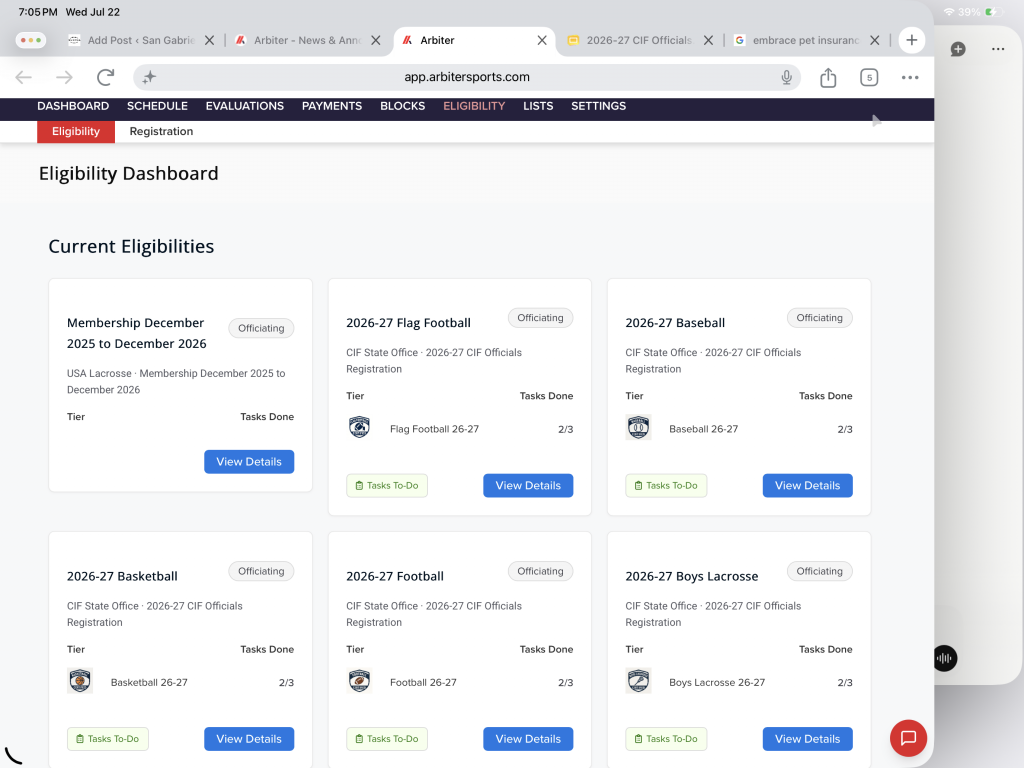
- Register for the CIF Officials Association using this link. If you’d like to follow along with a step-by-step registration tutorial, one is available here. Be sure to register for football and/or flag football and any other CIF sport you wish to officiate. If you decide to add another sport later, you can. If you decide not to do a sport you registered for, that is okay, too.
- Go to the CIF State Office Central Hub, either by selecting that when you log in to Arbiter or by switching views if you are already logged in.
- Click on “Eligibility”.
- Click the blue “Details” button to choose 2026-2027 Football and/or 2026-2027 Flag Football.
- a. For Football, click “Take Test” for the 2026 CFOA Football Rules Test.
b. For Flag Football, click “Take Test” for the 2026 CFOA Flag Football Rules Test. - Click “Continue” in the “Proceed To Eligibility?” box.
- Take and pass the test(s).
From what I understand, you get 10 chances to pass the test(s), and the tests are comprised of the same questions that are on the CFOA Summer Study Guide. However, the questions and answer choices are not in the same order. So, be careful when transcribing your answers!
Please be sure to take the 2026 CFOA Football Rules Test and the 2026 CFOA Flag Football Rules Test on the CIF State Office Central Hub on Arbiter. You must pass those tests in order to be assigned any games. Our assignor will not even see your name on the list of available officials if you do not pass those tests.